
Overview
The Analytics section on the Home page provides graphical and numerical insights about your dimensioners' performance. You can filter the data by date, type of dimensioner, and view detailed activity summaries to monitor your operations.
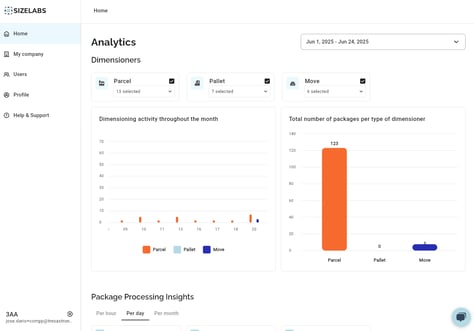
Caption: Default view of the Analytics dashboard with dimensioner type filters and calendar selector.
🛠 Filters Available
-
Date Picker
Use the calendar dropdown in the top right to select a single day, a week, a month, or the last 3 months. Press Apply to refresh the data.
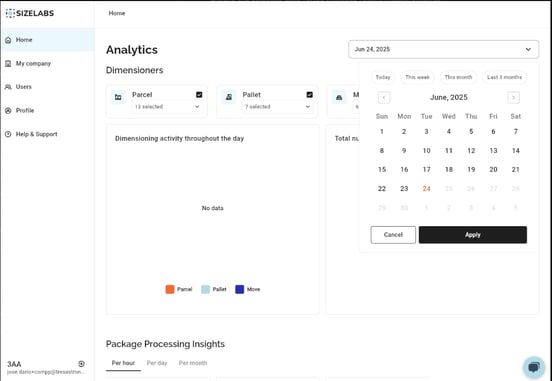
Caption: Date filter: select a single day or predefined ranges like This Week or Last 3 Months.
-
Dimensioner Types
Toggle filters for the dimensioners you want to include in the graphs:-
Parcel
-
Pallet
-
Move
-
You can select one, two, or all three dimensioner types.
Caption: Toggle filters to view Parcel, Pallet, or Move dimensioners independently or combined.
📈 Analytics Panels
1. Dimensioning Activity Throughout the Day
-
Shows the number of measurements taken, grouped by hour.
-
Helps identify peak and low usage times.
2. Total Number of Packages per Type of Dimensioner
-
Visual summary of how many packages were measured by each type (Parcel, Pallet, Move) in the selected time range.
📦 Package Processing Insights
These metrics are grouped under three tabs:
-
Per hour / Per day / Per month
-
Shows:
-
Total number of packages.
-
Time window with highest activity.
-
Time window with lowest activity.
-
Average processing speed (packages/hour).
-
-
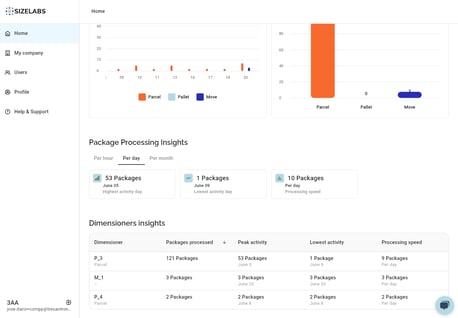
Caption: Hourly, daily, and monthly performance summaries help track your operation rhythm.
🔍 Dimensioners Insights (Detailed Table)
Table includes per-device metrics:
-
Dimensioner Name
-
Packages Processed
-
Peak Activity
-
Lowest Activity
-
Processing Speed
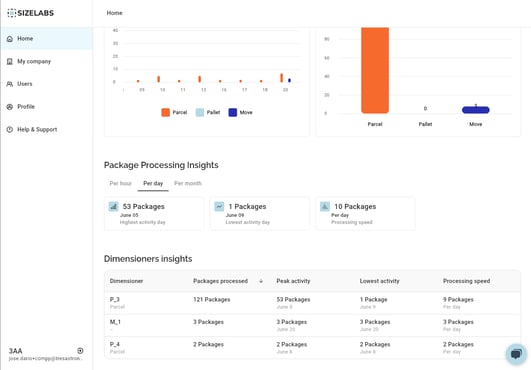
Caption: Compare individual device performance and identify underused units.
❗ Notes
-
If you see “No data”, ensure that:
-
At least one active dimensioner is selected.
-
The date range includes actual activity days.
-
-
Analytics may not update in real-time; wait a few seconds after changing filters.